
November 20, 2026 13:05 by
 Peter
We can send the key value pair from the aspx page itself if you are creating a Silverlight application and you need to enter certain parameters within, like a key and value pair. In Silverlight, we'll show how we can accomplish this.
Start a Silverlight Project
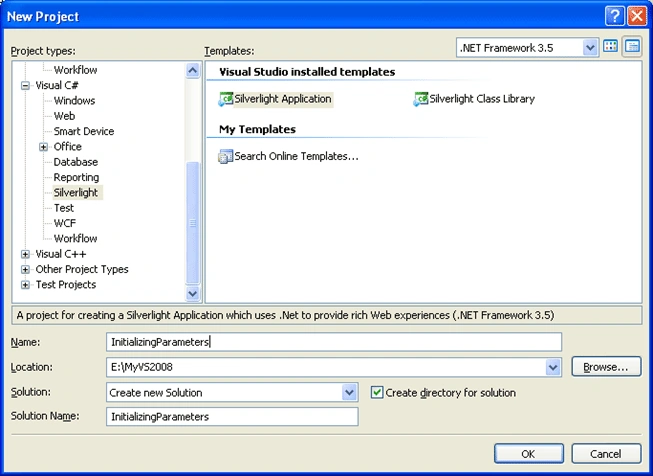
Adding parameters
Open the "InitializingParametersTestPage.aspx" and find the tagtag <asp:Silverlight add an attribute InitParameters
Enter the following code to the tag
InitParameters="Key1=Value1,Key2=Value2"
Defining the Parameters
In App.xaml.cs add an object of IDictionary<string,string> as follows
public IDictionary<string, string> AppParams;
In Application_Startup event initialize the parameters as follows
private void Application_Startup(object sender, StartupEventArgs e)
{
AppParams = e.InitParams;
this.RootVisual = new Page();
}
Using Parameters
In Page.xaml add ListBoxes to show the parameter values
Xaml Code
<UserControl x:Class="InitializingParameters.Page"
xmlns="http://schemas.microsoft.com/winfx/2006/xaml/presentation"
xmlns:x="http://schemas.microsoft.com/winfx/2006/xaml"
Width="400" Height="300">
<Grid x:Name="LayoutRoot" Background="#FFB7C2E5">
<Grid.ColumnDefinitions>
<ColumnDefinition Width="0.472*"/>
<ColumnDefinition Width="0.025*"/>
<ColumnDefinition Width="0.502*"/>
</Grid.ColumnDefinitions>
<ListBox x:Name="myKeysList"/>
<ListBox x:Name="myValuesList" Grid.Column="2"/>
</Grid>
</UserControl>
In code behind of the Page.xaml.cs add the following code to bind the parameters
namespace InitializingParameters
{
public partial class Page : UserControl
{
public Page()
{
InitializeComponent();
App myApp = App.Current as App;
foreach (string item in myApp.AppParams.Keys)
{
myKeysList.Items.Add(item);
}
foreach (string item1 in myApp.AppParams.Values)
{
myValuesList.Items.Add(item1);
}
}
}
}
Runnning the Application
When you run the application the list will carry the key and value pairs.
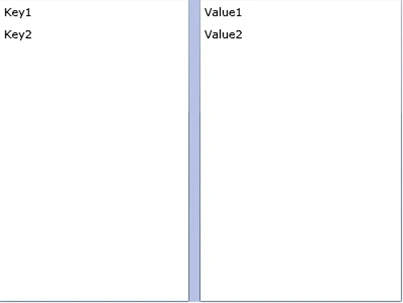
Hope you like the article, Enjoy Coding.
HostForLIFE.eu Silverlight 5 Hosting
HostForLIFE.eu is European Windows Hosting Provider which focuses on Windows Platform only. We deliver on-demand hosting solutions including Shared hosting, Reseller Hosting, Cloud Hosting, Dedicated Servers, and IT as a Service for companies of all sizes. We have customers from around the globe, spread across every continent. We serve the hosting needs of the business and professional, government and nonprofit, entertainment and personal use market segments.
