"Muggle-born have no access to go inside the chamber of secret Harry, and only a heir of Slytherin can open the chamber. Since he is already here, the chamber of secret, has already been opened."
As you have guessed already, those lines are said by Albus Dumbledore to Harry Potter. Wonder why Harry Potter? Actually, our Silverlight is very much similar to that of Hogwarts. In the case of authentication, I guess, to be precise. Silverlight provides the facility to authenticate the user using a particular query, making sure whether the querying user has the access to use the query or not. Just like you must authenticate yourself, before the door of any house in Hogwarts, while requesting it to open. If you are not authenticated then your request will be rejected. In Silverlight however, you must authenticate yourself at the very beginning of the application, through a process we call "Sign in".
Every application in Silverlight has the sign in process. You must login before you can use the application. a Business Template of Silverlight does come with this process in a build. But herein, we will create our own custom authentication classes from scratch. So let's jump in with both feet and create the application.
Before everything else, we need to create the database to use in the application. In SQL Server 2008 for the database that I am using for the demo, execute the following query.
Create database MyData
SET QUOTED_IDENTIFIER OFF;
GO
USE MyData;
GO
IF SCHEMA_ID(N'dbo') IS NULL EXECUTE(N'CREATE SCHEMA [dbo]');
GO
-- Dropping existing FOREIGN KEY constraints
-- Dropping existing tables
IF OBJECT_ID(N'[dbo].[UserDetail]', 'U') IS NOT NULL
DROP TABLE [dbo].[UserDetail];
GO
-- Creating all tables
-- Creating table 'UserDetails'
CREATE TABLE [dbo].[UserDetail] (
[UserID] int NOT NULL,
[Name] nvarchar(50) NOT NULL,
[Password] nvarchar(50) NOT NULL,
[Email] nvarchar(50) NULL
);
GO
-- Creating all PRIMARY KEY constraints
-- Creating primary key on [UserID], [Name] in table 'UserDetails'
ALTER TABLE [dbo].[UserDetail]
ADD CONSTRAINT [PK_UserDetails]
PRIMARY KEY CLUSTERED ([UserID], [Name] ASC);
GO
This will create the Database "MyData" and a table inside it, "UserDetail".

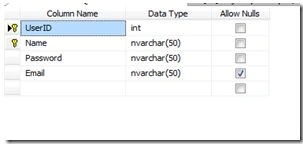
The image above shows my UserDetail table in the MyData database. Now let us create some users. For that, make some entries in the database.
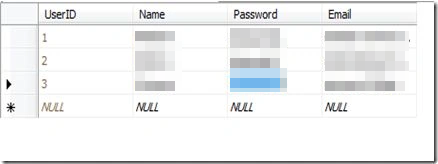
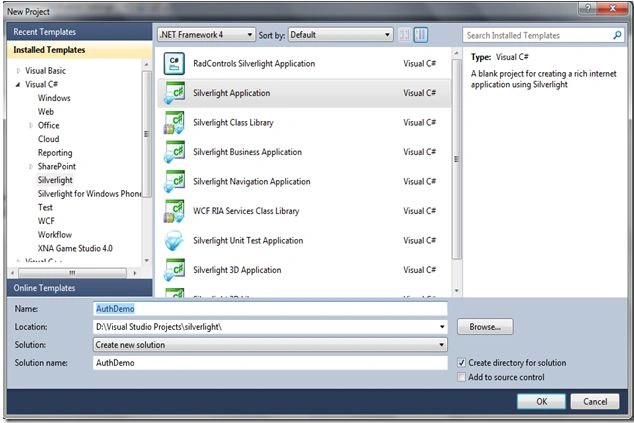
Our database is set and we are ready to go. The next step is to create a blank Silverlight application, "AuthDemo".
When the application is created and opened, you must have greeted with the mainpage.xaml file. So, before we go any further into services etc., let's first create a beautiful user interface for our application. Add the following lines of XAML into the grid of the main page.
<Grid x:Name="LayoutRoot" Background="White">
<TextBox Height="23"
HorizontalAlignment="Left"
Margin="132,92,0,0" Name="TxtName"
VerticalAlignment="Top" Width="120" />
<TextBox Height="23"
HorizontalAlignment="Left"
Margin="132,121,0,0" Name="TxtPass"
VerticalAlignment="Top" Width="120" />
<Button Content="Login" Height="23"
HorizontalAlignment="Left" Margin="177,160,0,0"
Name="BtnLogin" Click="BtnLogin_OnClick"
VerticalAlignment="Top" Width="75" />
<sdk:Label Height="28"
HorizontalAlignment="Left"
Margin="84,42,0,0" Name="LoggedInPerson"
VerticalAlignment="Top" Width="120" />
</Grid>
Our layout is also ready. It's time now to do things that a real developer does, create models and services. Entity data models are the ADO.Net entities that are linked to the database, and work as the mediator between the application and the database. I am not going to show in detail here how to create the entity data model in the application. Rather I am assuming that readers at least know how to create the data model in Silverlight from the database. So create an entity data model basing it on the database that we just have created, MyData, and name it "AuthModel". It's a good practice to keep the model, services, classes and others inside separate folders in the project. So the AuthModel should be placed in the Model folder.
Build the project once.
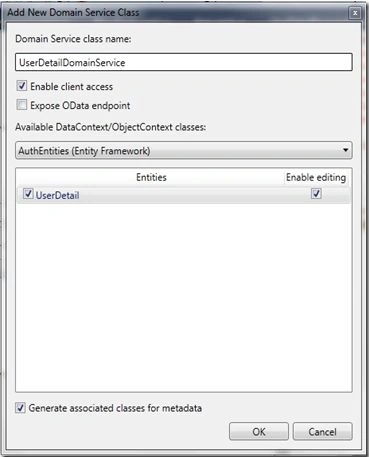
If the project builds and compiles successfully, the time has come to add services to it. First let us add a Domain Service. Right-click on the service folder (if you have created one, else right-click on the entire project itself) in the web project, select "Add" –> "New Item" and choose "Domain service". Name the service "UserDetailDomainService".
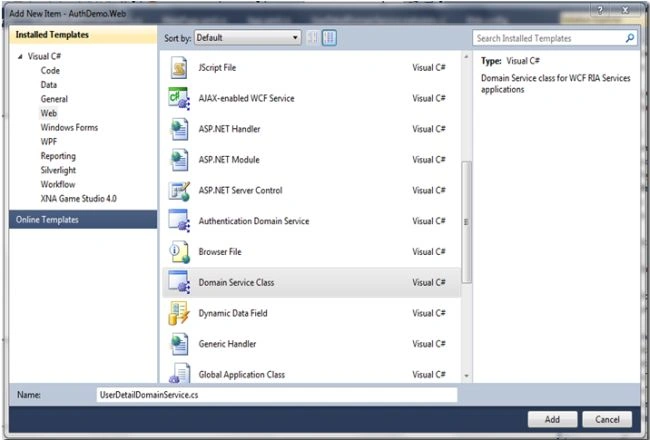
After clicking on the Add button, you will see a dialog box open asking to select the entities to be included in the service. For now the box would only have User Detail. Just check the enable editing box, click "Ok" and you are done.
You are now ready with the Service and Model. The next thing to do is to add an authentication service. Just as you do to add the domain service, do exactly the same to add the authentication service, but this time now, choose "Authentication Domain Service" instead. Name the service "CustomAuthDomainService". Remove "AuthenticationBase<User>" and remove the User class then Inherit and the "implement LinqToEntitiesDomainService<AuthEntities>" class and the "IAuthentication<UserDetail>" interface.
Before proceeding further, create another folder named "Classes" in the web project and add a class "UserDetail" to it. Add the keyword "partial" to make the class a partial class of the UserDetail class that already exists in the UserDetailMetadata that we created with the service. Now implement the IUser interface in the class. On doing so, your class would have become:
namespace AuthDemo.Web.Class
{
public partial class UserDetail : IUser
{
public string Name
{
get
{
throw new NotImplementedException();
}
set
{
throw new NotImplementedException();
}
}
public IEnumerable<string> Roles
{
get
{
throw new NotImplementedException();
}
set
{
throw new NotImplementedException();
}
}
}
}
The Name property is not required. Remove that property, also since the two UserDetail classes (one of Metadata and one above) are partial, that is both the classes are incomplete without each other. Wow! How elegant. So they must be in the same namespace. Since our Metadata's class was in the "AuthDemo.Web.Model" we need to change the namespace of this class also, from "AuthDemo.Web.Classes" to "AuthDemo.Web.Model". Change the namespace, remove the Name property, then just compile.
Here is the final version of the UserDetail Class:
namespace AuthDemo.Web.Model
{
public partial class UserDetail : IUser
{
[DataMember]
public IEnumerable<string> Roles
{
get
{
return null;
}
set
{
}
}
}
}
Moving back to our CustomAuthentication Service that now looks like:
[EnableClientAccess]
public class CustomAuthDomainService : LinqToEntitiesDomainService<AuthEntities>, IAuthentication<UserDetail>
{
// To enable Forms/Windows Authentication for the Web Application, edit the appropriate section of web.config file.
public UserDetail GetUser()
{
throw new NotImplementedException();
}
public UserDetail Login(string userName, string password, bool isPersistent, string customData)
{
throw new NotImplementedException();
}
public UserDetail Logout()
{
throw new NotImplementedException();
}
public void UpdateUser(UserDetail user)
{
throw new NotImplementedException();
}
}
Now remove the exception throw and add the following code into each function as done here:
[EnableClientAccess]
publicclass CustomAuthDomainService : LinqToEntitiesDomainService<AuthEntities>, IAuthentication<UserDetail>
{
private static UserDetail DefaultUser = new UserDetail()
{
Name =string.Empty,
Email =string.Empty,
Password =string.Empty,
UserID = 0
};
// To enable Forms/Windows Authentication for the Web Application, edit the appropriate section of web.config file.
public UserDetail GetUserMy(string userName)
{
return this.ObjectContext.UserDetails.FirstOrDefault(x => x.Name == userName);
}
public UserDetail Login(string userName, string password,bool isPersistent, string customData)
{
if (this.ValidateUser(userName, password))
{
FormsAuthentication.SetAuthCookie(userName, isPersistent);
return this.GetUserMy(userName);
}
return null;
}
private bool ValidateUser(string username,string password)
{
return this.ObjectContext.UserDetails.Any(u => u.Name == username && u.Password == password);
}
public void InsertUser(UserDetail user)
{
if ((user.EntityState != EntityState.Detached))
{
this.ObjectContext.ObjectStateManager.ChangeObjectState(user, EntityState.Added);
}
else
{
this.ObjectContext.UserDetails.AddObject(user);
}
}
public UserDetail Logout()
{
FormsAuthentication.SignOut();
return CustomAuthDomainService.DefaultUser;
}
public void UpdateUser(UserDetail user)
{
// Ensure the user data that will be modified represents the currently
// authenticated identity
if ((this.ServiceContext.User == null) ||
(this.ServiceContext.User.Identity == null) ||
!string.Equals(this.ServiceContext.User.Identity.Name, user.Name, System.StringComparison.Ordinal))
{
throw newUnauthorizedAccessException("You are only authorized to modify your own profile.");
}
this.ObjectContext.UserDetails.AttachAsModified(user,this.ChangeSet.GetOriginal(user));
}
public UserDetail GetUser()
{
return null;
}
}
We are getting very close.
In the constructor of App.xaml.cs add the following line to set the WebContext as the global object throughout the application:
WebContext webContext;
webContext = new WebContext();
webContext.Authentication =
new System.ServiceModel.DomainServices.Client.ApplicationServices.FormsAuthentication();
this.ApplicationLifetimeObjects.Add(webContext);
Just on the edge of finishing. Last thing to do is to write the code for login in the Login Button click event.
private void BtnLogin_OnClick(object sender, RoutedEventArgs e)
{
var temp =
WebContext.Current.Authentication.Login(TxtName.Text.Trim().ToLower(), TxtPass.Text);
temp.Completed += new EventHandler(temp_Completed);
}
void temp_Completed(object sender, EventArgs e)
{
var login =
((System.ServiceModel.DomainServices.Client.ApplicationServices.LoginOperation)(sender));
if (login.LoginSuccess)
{
LoggedInPerson.Content = "Welcome " + WebContext.Current.User.Name;
}
else
{
LoggedInPerson.Content = "Invalid credentials";
}
}
Ok, all over. Build and run the project. Since we've already entered the data just type in the credentials:
User Name : Peter
Password : Peter@1
HostForLIFE.eu Silverlight 5 Hosting
HostForLIFE.eu is European Windows Hosting Provider which focuses on Windows Platform only. We deliver on-demand hosting solutions including Shared hosting, Reseller Hosting, Cloud Hosting, Dedicated Servers, and IT as a Service for companies of all sizes. We have customers from around the globe, spread across every continent. We serve the hosting needs of the business and professional, government and nonprofit, entertainment and personal use market segments.
